
When your website outgrows shared hosting, a Virtual Private Server (VPS) is usually the next smart step.
But the real confusion starts when you must choose between managed vs unmanaged VPS hosting.
Both options give you dedicated resources like CPU, RAM, and storage on a virtual server, but they differ a lot in who manages what.
Your decision affects cost, performance, security, and how much time you spend handling technical tasks.
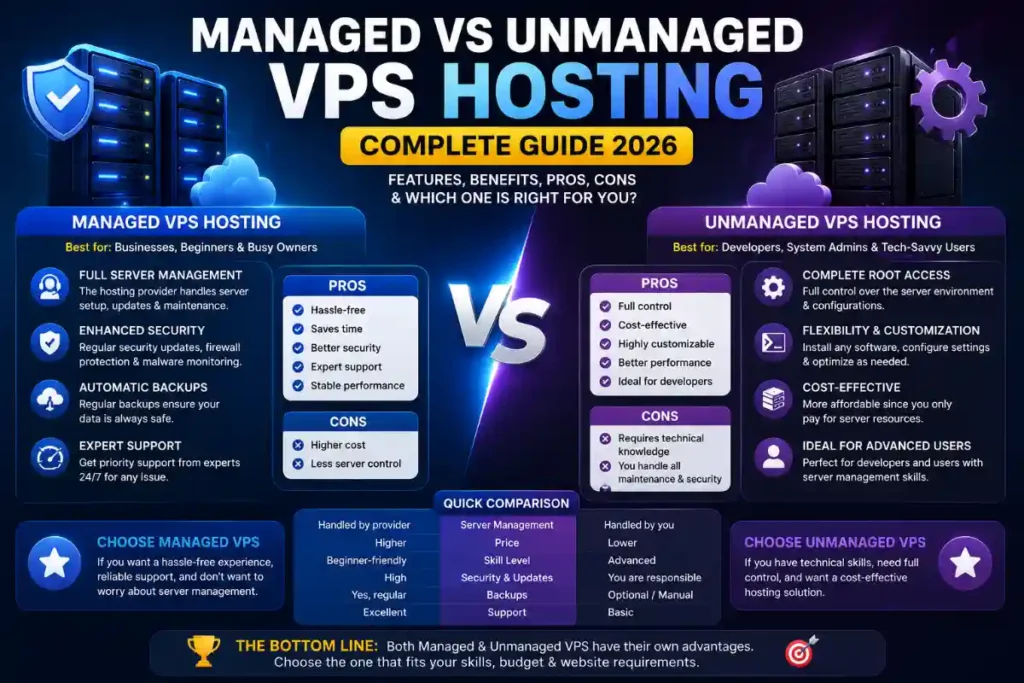
In this complete guide, you’ll learn what managed and unmanaged VPS hosting really mean, how they work, who they’re for, and which one fits your budget and skill level in 2026.
What Is VPS Hosting?
A VPS (Virtual Private Server) is a hosting environment where one physical server is split into multiple virtual servers using virtualization technology.
Each virtual server behaves like an independent machine with its own operating system, dedicated CPU, RAM, storage, and bandwidth.
Unlike shared hosting, your resources are isolated, so other websites on the same physical server can’t directly affect your performance.
You get many of the benefits of a dedicated server but at a much lower cost, which is why VPS is popular among growing websites and apps.
Managed VPS Hosting: Meaning and How It Works
What Is Managed VPS Hosting?
Managed VPS hosting is a VPS plan where the hosting provider takes care of most technical server tasks for you.
This typically includes setup, configuration, security hardening, updates, monitoring, and sometimes performance optimization.
You still get your own virtual server and resources, but you don’t have to be a Linux expert or system administrator to keep it running smoothly.
What Does a Managed VPS Usually Include?
While the exact features vary by provider, managed VPS hosting commonly covers:
- Server setup and initial configuration
- Operating system installation and updates
- Security patches and regular maintenance
- Firewall configuration and basic security hardening
- 24/7 technical support for server-related issues
- Performance monitoring and resource optimization
- Backup configuration and sometimes automated backups
Some providers also offer managed WordPress or managed application stacks, where they optimize the environment for specific CMS or frameworks.
Who Should Choose Managed VPS?
Managed VPS hosting is ideal if:
- You don’t have strong server administration skills
- You want to focus on your business, content, or product instead of server tasks
- Uptime, security, and reliability are more important than having total control
- You run e‑commerce, SaaS, or client sites where downtime can be costly
For bloggers, agencies, and business owners who just want a fast, secure website without touching the command line, managed VPS is usually the safer choice.
Unmanaged VPS Hosting: Meaning and How It Works
What Is Unmanaged VPS Hosting?
Unmanaged VPS hosting gives you a bare server (often with just an OS or even just root access), and you’re responsible for everything else.
The host maintains the hardware and network, but all software installation, configuration, updates, and security are on you.
You get full root access and complete control over the environment, similar to having your own dedicated server.
What Are You Responsible For?
On an unmanaged VPS, you (or your developer/sysadmin) typically handle:
- Installing and configuring the operating system (if not preinstalled)
- Setting up web server, database, PHP/Node/other runtime
- Managing users, permissions, and SSH access
- Configuring firewalls and security measures
- Applying security patches and updates
- Monitoring server load, resource usage, and logs
- Setting up and validating backups and disaster recovery
If something breaks due to your configuration, support from the host is often limited to basic infrastructure issues.
Who Should Choose Unmanaged VPS?
Unmanaged VPS is suitable if:
- You have strong Linux/Windows server administration skills
- You want maximum control and customization
- You run custom stacks or non-standard software
- You’re sensitive to monthly cost and willing to trade time for savings
- You’re a developer, devops engineer, or technical agency managing multiple projects
For technical users, unmanaged VPS can be a powerful and flexible option, especially when you want to fine‑tune every layer of the stack.
Key Differences: Managed vs Unmanaged VPS Hosting
Side-by-Side Overview
Cost Comparison and Hidden Costs
Managed VPS hosting has a higher base monthly cost because you’re paying for the provider’s expertise, tools, and support.
However, unmanaged VPS can have “hidden” costs like the time spent on maintenance, potential downtime, and sometimes hiring external freelancers or admins.
For example, saving a few dollars per month on unmanaged hosting may not be worth it if you lose hours every week managing security updates.
In business terms, your time and peace of mind are part of the total cost of ownership.
Benefits of Managed VPS Hosting
1. Less Technical Hassle
You don’t have to manage security patches, OS upgrades, or complex server configurations.
This is especially valuable if your primary work is marketing, content, sales, or product development rather than server administration.
2. Enhanced Security and Monitoring
Managed providers usually implement standard security hardening, firewalls, and intrusion detection and keep everything updated.
They also monitor your server for anomalies, resource spikes, and performance issues, often fixing problems before you even notice.
3. Reliable Support
With managed VPS hosting, you typically get 24/7 support for server-level issues, configuration help, and troubleshooting.
This can be a lifesaver during traffic spikes or unexpected outages, especially for e‑commerce and mission-critical sites.
4. Better Focus on Growth
Since the provider handles the technical under-the-hood stuff, you can focus on growing your business, optimizing funnels, and creating content.
For many non-technical founders, this alone justifies the extra monthly cost.
Benefits of Unmanaged VPS Hosting
1. Full Control and Customization
You can choose the OS, stack, control panel, and all software exactly the way you want.
This is ideal for developers building custom applications, microservices, or using non-standard technologies.
2. Lower Base Cost
Unmanaged VPS plans are usually cheaper per month because you’re not paying for management time.
For technically skilled users managing multiple servers, this can lead to significant savings at scale.
3. Learning and Experimentation
If you’re a developer or student, unmanaged VPS is a great environment to learn Linux administration, security, and deployment best practices.
You can experiment with different stacks, containers, and automation tools without the limitations of managed policies.
Managed vs Unmanaged VPS in 2026: Trends You Should Know
The VPS hosting market continues to grow as more businesses move online and demand scalable, cost-effective infrastructure.
In 2026, several trends affect how managed and unmanaged VPS hosting are delivered and used.
AI-Assisted Management
AI-based tools are increasingly helping with resource allocation, performance tuning, and anomaly detection on VPS environments.
Managed VPS providers are adopting these tools to automate monitoring, auto-scaling, and proactive troubleshooting.
Growing Demand from E‑commerce and SMBs
More e‑commerce owners, bloggers, and small businesses are upgrading from shared hosting to VPS for better performance and security.
This drives demand especially for managed VPS, because many of these users do not have in-house technical teams.
Hybrid Models
Some providers now offer “semi-managed” or “assisted” VPS plans, where basic tasks are handled by the host but advanced customization is up to you.
These hybrid options try to balance flexibility and convenience for intermediate users.
How to Decide: Managed vs Unmanaged VPS (Step-by-Step)
Use this step-by-step framework to choose the right VPS hosting type for your situation.
Step 1: Assess Your Technical Skills
- Can you manage Linux or Windows servers from the command line?
- Are you comfortable configuring Nginx/Apache, firewalls, and SSL?
If the answer is “no” for most questions, managed VPS is usually the better starting point.
Step 2: Clarify Your Time Availability
- Do you have several hours per month to handle updates and troubleshooting?
- Will server work distract you from higher-value activities?
If your time is already stretched, paying extra for managed hosting often makes financial sense.
Step 3: Evaluate Your Project Type
- E‑commerce, membership sites, and client projects benefit from reliability and support (managed VPS).
- Developer sandboxes, experimental apps, or custom stacks are often better on unmanaged VPS.
Step 4: Set a Realistic Budget
Calculate not just the monthly hosting fee but also the potential cost of downtime or hiring experts.
Sometimes a slightly higher monthly price is cheaper than one serious outage or security incident.
Step 5: Shortlist Providers and Compare Features
Compare managed vs unmanaged VPS plans on:
- CPU, RAM, storage, and bandwidth
- Management level and included services
- Backup policies
- Support response times
- Data center locations and uptime SLAs
Pick the plan that matches your technical comfort, performance needs, and growth expectations.
Common Mistakes When Choosing VPS Hosting
1. Choosing Unmanaged VPS Just Because It’s Cheaper
Many users pick unmanaged VPS to save money, then get stuck with configuration issues, downtime, or security problems.
If you’re not technical, these hidden costs quickly outweigh the price difference.
2. Ignoring Security Responsibilities
On unmanaged VPS, skipping updates and proper hardening leaves your server exposed to attacks.
Security is not a one-time task; it’s continuous, and many users underestimate this.
3. Overestimating Technical Skills
Following a few tutorials is not the same as long-term server administration.
If you’re unsure how to recover from a misconfiguration or hack, managed VPS might be safer.
4. Not Planning for Growth
Some people choose a very small unmanaged VPS and then struggle as traffic grows.
Managed VPS providers often help you scale resources smoothly with minimal downtime.
Important Highlights (Quick Recap)
- VPS hosting gives you isolated resources and more control compared to shared hosting.
- Managed VPS: host handles server management, security, updates, and often backups.
- Unmanaged VPS: you get full control but must manage everything yourself.
- Managed VPS costs more monthly but saves time and reduces risk, ideal for non-technical owners.
- Unmanaged VPS is cheaper and more flexible but requires strong technical skills.
- 2026 trends: AI-assisted monitoring, rising demand from SMBs, and hybrid management models.
FAQs About Managed vs Unmanaged VPS Hosting
1. Which is better: managed or unmanaged VPS hosting?
Neither is universally “better”; it depends on your technical skills, budget, and how much time you can devote to server management.
Non-technical users and most businesses are usually better off with managed VPS, while developers may prefer unmanaged VPS for control.
2. Is managed VPS worth the extra cost?
For most businesses, yes.
The added stability, security, and professional support often prevent costly downtime and reduce the stress of managing the server yourself.
3. Can I switch from unmanaged to managed VPS later?
Many providers allow you to upgrade from unmanaged to managed VPS or migrate your server to a managed plan.
However, it’s easier if you start with a host that offers both options and clear migration paths.
4. Do I still get root access with managed VPS?
Some managed VPS plans provide root access, while others restrict it to protect server stability.
Check the provider’s documentation; in many cases you get enough control for most tasks even without full root.
5. Is unmanaged VPS good for beginners?
In most cases, no.
Beginners usually lack the experience to safely manage updates, firewalls, and troubleshooting on their own, which can lead to downtime or security issues.
6. How does VPS hosting compare to shared hosting?
VPS hosting offers dedicated resources, better performance, and more control, while shared hosting is cheaper but limited and more affected by other users.
VPS is the natural upgrade when your site outgrows shared hosting.
Conclusion
Choosing between managed vs unmanaged VPS hosting is ultimately about balancing control, cost, and convenience.
If you value stability, security, and support—and don’t want to live in the terminal—managed VPS is usually the right path.
If you’re a developer or sysadmin who enjoys full control and knows how to manage a server, unmanaged VPS gives you flexibility and lower base costs.
Take an honest look at your skills, time, and business priorities, then pick the VPS hosting type that lets you grow without unnecessary stress.