
Choosing between shared hosting and VPS hosting in 2026 is one of the most important decisions you’ll make for your website’s long‑term success.
Both options can host your site, but they behave very differently when it comes to performance, security, and scalability.
In simple terms, shared hosting is like renting a bed in a hostel, while VPS hosting is like renting your own small apartment in the same building.
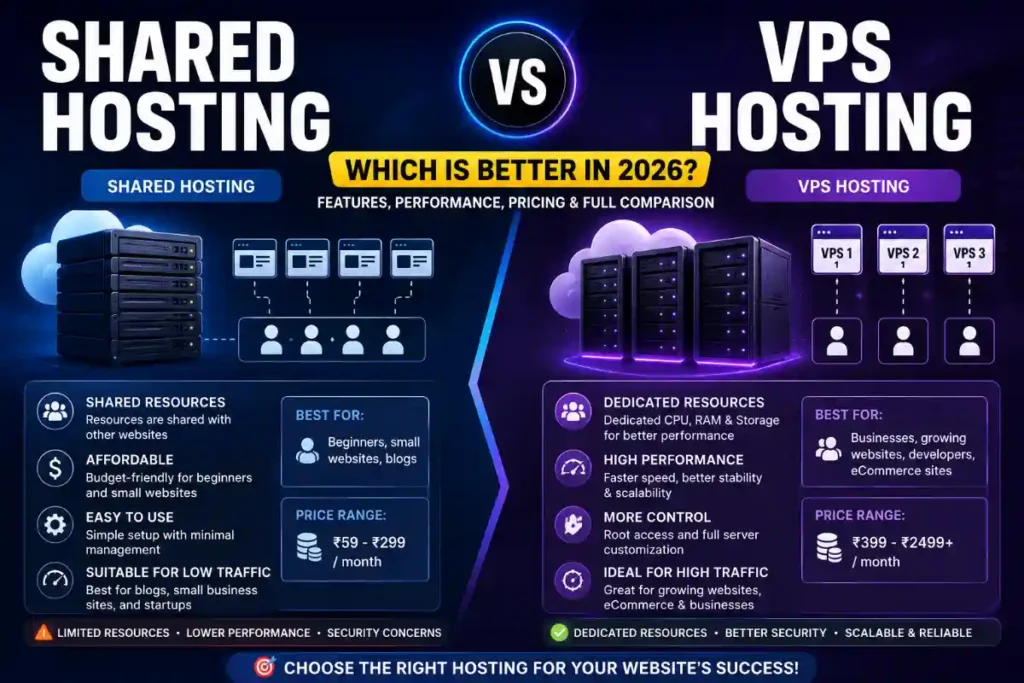
The right choice depends on your traffic, budget, and how much technical control you need over the server.
In this guide, you’ll learn how shared hosting and VPS hosting work, the key differences, real‑world use cases, latest 2026 trends, and a clear checklist to decide what’s better for you right now.
What Is Shared Hosting in 2026?
Shared hosting means multiple websites share the same physical server and its resources like CPU, RAM, and storage.
Hosting providers manage the server, so you rarely deal with technical configurations, which is why it is popular with beginners and small websites.
In 2026, entry‑level shared hosting plans usually cost around 2–10 USD per month, making them one of the cheapest ways to get a site online.
However, a single shared server can host hundreds of different accounts, which can impact speed and reliability during traffic spikes.
Key Features of Shared Hosting
- Low monthly cost and beginner‑friendly pricing.
- Simple setup, one‑click installers, and managed server environment.
- Limited resources and lower performance compared to VPS.
- Less control over server configurations and software versions.
- Security depends heavily on how the hosting company isolates accounts and maintains the server.
Best Use Cases for Shared Hosting
- New blogs and personal websites with low traffic.
- Portfolio sites, brochure sites, and local business websites with a few pages.
- Early‑stage startup landing pages testing an idea.
- Beginners who want a simple, managed environment without server management.
What Is VPS Hosting in 2026?
VPS (Virtual Private Server) hosting uses virtualization technology to divide a single physical server into multiple isolated virtual servers.
Each VPS gets dedicated resources (CPU, RAM, storage) and behaves almost like a small dedicated server with its own operating system and configuration.
Managed VPS plans with around 2 vCPU and 4 GB RAM now usually start between 18–35 USD per month, while some unmanaged VPS options can go as low as 5–15 USD.
This makes VPS a mid‑range option between shared hosting and expensive dedicated servers.
Key Features of VPS Hosting
- Dedicated virtual resources for stable and predictable performance.
- Root access and deeper control over software, security, and server settings.
- Better isolation from other users on the same physical machine, improving security.
- Easy vertical scaling by increasing CPU, RAM, and storage as your site grows.
- Option to choose managed VPS (host handles server tasks) or unmanaged (you manage everything).
Best Use Cases for VPS Hosting
- Growing blogs or content sites with significant monthly traffic.
- E‑commerce stores and membership sites where uptime affects revenue.
- SaaS apps, learning platforms, and custom web applications.
- Agencies hosting multiple client sites with higher performance requirements.
- Projects that require custom server configurations or higher security (for example, handling sensitive user data).
Shared Hosting vs VPS Hosting: Core Differences
1. Performance and Speed
On shared hosting, your site’s performance depends on how many other websites are using the same resources and what they’re doing.
If a “noisy neighbor” suddenly gets a traffic spike or runs heavy scripts, your site can slow down or even go offline.
VPS hosting allocates dedicated resources to your virtual server, so other users’ traffic does not affect your CPU and RAM directly.
As a result, load times and overall performance are more stable and predictable, even during busy periods.
2. Security
Shared hosting providers apply account isolation and security tools, but a vulnerability in one site or misconfiguration at the server level can increase overall risk.
It’s generally safe for small, low‑risk projects, but not ideal for data‑sensitive applications.
In VPS hosting, your environment is isolated at the virtual machine level, with your own OS, firewall, and security configurations.
This separation and the ability to harden your server give VPS an edge for higher‑risk or business‑critical sites.
3. Control and Customization
Shared hosting gives you a control panel (like cPanel or a custom dashboard), but you cannot deeply modify server‑level configurations or install certain software.
You work within the limits set by the hosting provider.
VPS hosting, especially unmanaged, usually offers full root access, letting you choose the operating system, install custom stacks, and tune performance.
This is powerful for developers and businesses with specific technical needs, but it also requires more responsibility.
4. Scalability
Scaling shared hosting typically means moving to a higher shared plan or eventually migrating to VPS or cloud hosting.
There are hard limits because you still share the same underlying hardware with many other users.
VPS hosting scales more smoothly: you can increase RAM, CPUs, and storage from the same panel without changing environments in many providers.
This makes VPS hosting a better long‑term choice for projects that expect growth.
5. Pricing in 2026
- Shared hosting: roughly 2–10 USD per month for entry‑level plans.
- Managed VPS: often 18–35 USD per month for mid‑range resources.
- Unmanaged VPS: as low as 5–15 USD for developers who can handle configuration themselves.
Although VPS hosting costs more, the performance and control upgrade is significant for serious projects.
Quick Comparison Table
2026 Hosting Trends That Affect Your Choice
In 2026, web hosting is more performance‑driven than ever thanks to Core Web Vitals, heavier web apps, and rising traffic from mobile devices.
This is pushing many serious website owners to move from basic shared hosting to VPS or cloud‑based solutions.
Several trends make VPS hosting particularly attractive:
- Advanced security focus: Hosting companies are adding stronger security layers to VPS plans to deal with rising cyber threats.
- Green and sustainable hosting: Many providers are optimizing VPS infrastructure to be more energy‑efficient and eco‑friendly.
- Edge computing: Some VPS platforms are integrating edge locations to reduce latency by serving content closer to users.
- Hybrid and cloud‑style scaling: Hybrid cloud and VPS combinations allow flexible scaling without full dedicated servers.
- AI‑powered optimization: AI and machine learning are increasingly used to optimize VPS performance and detect anomalies.
Shared hosting is still evolving with better control panels and resource management, but it remains designed for simpler use cases.
SEO Impact: Shared Hosting vs VPS Hosting
From an SEO perspective, Google doesn’t directly favor VPS over shared hosting just because of the hosting type.
However, the underlying factors affected by hosting—speed, uptime, and security—do influence your rankings and user experience.
On heavily loaded shared servers, your page speed can drop during peak times, which might hurt engagement and indirectly impact SEO.
With VPS hosting, dedicated resources and better performance help you maintain more consistent load times and uptime, which supports better search performance.
If your site is small and lightweight, optimized shared hosting can still perform well enough.
But as soon as your traffic, pages, or plugins increase, VPS hosting usually becomes the more SEO‑friendly option because it can handle higher loads more reliably.
When Shared Hosting Is the Better Choice
Shared hosting can be the smarter option in 2026 if your situation looks like this:
- You’re launching your first website and just need to get online.
- Monthly traffic is low (for example, a few hundred to a few thousand visits).
- You don’t run heavy plugins, complex apps, or large e‑commerce catalogs.
- You prefer a fully managed, “set it and forget it” environment.
- Budget is very tight and every dollar matters.
In these scenarios, paying extra for VPS hosting may not give you a noticeable benefit yet.
You can start with shared hosting and plan an upgrade path when your analytics show consistent growth in traffic and resource usage.
When VPS Hosting Is the Better Choice
VPS hosting becomes the clear winner once your website moves beyond the basics.
You should seriously consider VPS in 2026 if:
- Your website is a key revenue source (e‑commerce, courses, SaaS, memberships).
- You experience traffic spikes during promotions, launches, or seasonal events.
- You need custom server settings (for example, specific PHP versions, Node.js, or advanced caching).
- Security and compliance are more critical, such as handling user accounts and payments.
- You host multiple sites and want consistent performance across all of them.
In these cases, the extra cost of VPS hosting is usually a small price to pay compared to the potential revenue loss caused by downtime or slow performance.
Important Highlights: Shared Hosting vs VPS Hosting
- Shared hosting is best for beginners, small sites, and low budgets.
- VPS hosting is best for serious projects that need performance, control, and security.
- 2026 trends like AI optimization, edge computing, and advanced security mostly favor VPS platforms.
- From an SEO perspective, hosting type matters less than actual speed, uptime, and reliability.
- It’s common to start on shared hosting and upgrade to VPS as your site grows.
Benefits and Features of VPS Hosting (Why Many Upgrade in 2026)
Performance Benefits
- Dedicated CPU and RAM prevent resource stealing from other users.
- More consistent TTFB and load times, especially under heavier loads.
- Better ability to use advanced caching, CDNs, and performance tuning.
Security Benefits
- Isolated environment limits cross‑account risks common in shared setups.
- Custom firewalls, malware scanners, and backup strategies.
- Easier to comply with stricter security requirements for handling user data.
Business and Growth Benefits
- Smooth scaling as traffic increases instead of big jumps between plans.
- Suitable for hosting multiple sites for clients or multiple brands.
- Higher reliability helps protect your brand reputation and conversion rates.
Step‑by‑Step: How to Decide Between Shared Hosting and VPS Hosting
Use this simple process to choose the right hosting type for your situation in 2026.
Step 1: Analyze Your Traffic and Growth
- Check your current monthly visitors (or realistic estimates for new sites).
- Consider expected growth in the next 12–24 months.
- If you aim for significant growth or plan paid campaigns, lean towards VPS.
Step 2: Assess How Critical Your Site Is
- Is this a hobby or a core business asset?
- If downtime could directly cost you money or leads, VPS is safer.
- If it’s primarily informational and low traffic, shared hosting can work.
Step 3: Evaluate Your Budget
- List how much you can comfortably invest monthly in hosting.
- If your budget is under 10 USD and you’re just starting, shared hosting fits.
- If you can allocate 20–30 USD and need stability, VPS hosting is worth it.
Step 4: Consider Your Technical Skills
- If you’re non‑technical and don’t want to manage servers, choose either shared hosting or a fully managed VPS.
- If you (or your team) have Linux/server skills, unmanaged VPS can give maximum flexibility at lower cost.
Step 5: Think About Future Migration
- Starting on shared and moving to VPS later is common, but migration still takes planning.
- If you already know your project will grow fast, skipping shared and starting on VPS can save time and avoid migrations.
Common Mistakes to Avoid
- Staying on shared hosting for too long: Many owners delay upgrading even when their site slows down, hurting conversions and SEO.
- Jumping into unmanaged VPS without skills: A misconfigured VPS can be less secure and slower than a good shared plan.
- Choosing only by price: Very cheap plans that oversell resources often lead to poor performance.
- Ignoring backups and security: Whether shared or VPS, you still need backups, SSL, updates, and hardening.
- Over‑provisioning: Paying for a high‑end VPS when your site is tiny wastes budget that could go into content or marketing.
FAQs: Shared Hosting vs VPS Hosting in 2026
1. Is VPS hosting always better than shared hosting?
No. VPS hosting is more powerful and flexible, but that doesn’t mean it’s always the best choice.
For small, low‑traffic sites with very limited budgets, shared hosting is more than enough and much easier to manage.
2. Does VPS hosting improve SEO compared to shared hosting?
Indirectly, yes. VPS hosting can provide better speed and uptime, which support a better user experience and can positively influence SEO.
However, Google does not rank sites higher just because they are on a VPS; the real impact comes from performance, reliability, and quality content.
3. When should I upgrade from shared hosting to VPS hosting?
You should consider upgrading when you notice frequent slowdowns, downtime, or resource limits on your shared plan.
It’s also time to move if your site becomes a key income source or you need custom configurations that shared hosting doesn’t support.
4. Is managed VPS worth paying extra for?
For non‑technical users or busy teams, managed VPS is usually worth the extra cost.
The provider handles updates, security, and monitoring so you can focus on your business instead of server administration.
5. Can I host multiple websites on a VPS?
Yes. One of the big advantages of VPS hosting is the ability to host multiple websites with isolated configurations and better performance.
Agencies and freelancers often use a single VPS to manage several client projects efficiently.
6. What about cloud hosting vs VPS hosting?
Cloud hosting uses a network of servers to provide flexible, often pay‑as‑you‑go resources, while a VPS usually runs on one physical machine cluster.
Many modern VPS solutions sit on top of cloud infrastructure anyway, so for most small to medium projects, a well‑configured VPS plan is sufficient.
Conclusion: Shared Hosting vs VPS Hosting – Which Is Better in 2026?
In 2026, shared hosting vs VPS hosting is not a battle of good vs bad—it’s about choosing the right tool for your current stage.
Shared hosting is ideal for beginners, small sites, and tight budgets that need simplicity more than raw power.
VPS hosting, on the other hand, is the smarter long‑term choice for serious projects that demand speed, reliability, security, and room to grow.
If your website plays a direct role in generating revenue or leads, VPS hosting is generally the better investment.
A practical strategy is to start lean on a quality shared hosting plan, keep an eye on your performance and traffic, and move to VPS hosting once you outgrow those early limits.
That way, you balance cost with performance and ensure your hosting evolves as your online presence scales.